Generative AI for RFP Responses: A Practical Guide to Which Tools Are Best to Use When


Generative AI has gone from novelty to norm for RFP teams. In just two years, the share of teams using it in their response workflows has more than doubled, from 34% to 79%, according to the 2026 RFP Response Trends Report.
The question is no longer whether to use AI, but how to use it well.
In this article, you’ll learn where generative AI delivers the most value, why governance matters today, and which tools to use when for response work.
Key Takeaways
→ 57% of teams use general AI tools like ChatGPT or Copilot for RFP responses, but more are turning to the AI in their RFP software, which may signal a growing need for accuracy, not just speed.
→ General AI tools offer flexibility, which is great for iterative work, but RFP software connects your content, people, and processes, so AI automation runs on governed, trusted answers.
→ You don’t have to choose between general AI tools and RFP software. MCP connects your AI assistants to your governed content in RFP software like Loopio, so each does what it does best.
Which Generative AI Tools Do Teams Use for RFP Responses?
57% of teams use general AI tools like ChatGPT or Copilot for RFP responses, while 43% use RFP software with built-in AI. General AI tools remain the more popular choice, but use of purpose-built software has climbed from 33% last year, a sign of growing interest in AI designed for the response process.
Among teams using AI, most of them are putting it to work for writing tasks, from generating specific answers to completing a first draft.
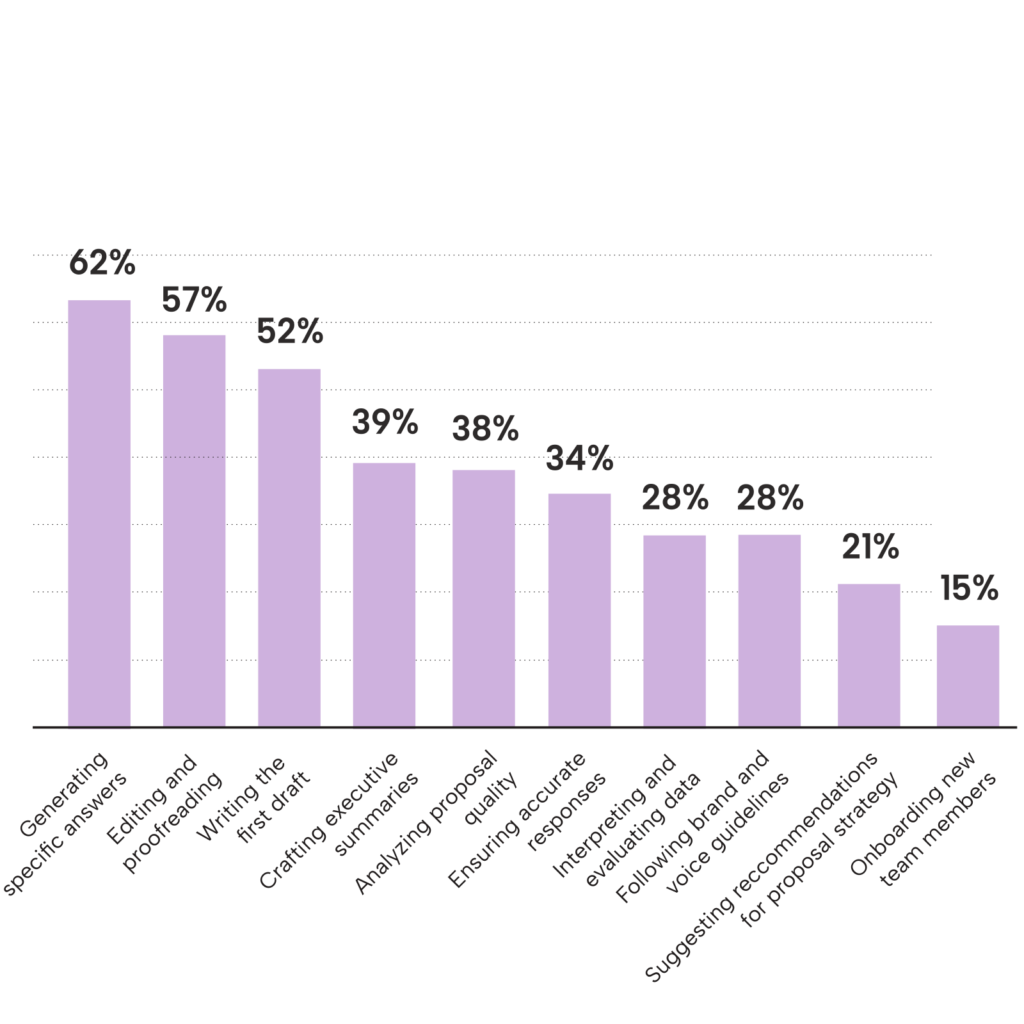
Notably, only 34% of teams use AI to help ensure their responses are accurate. That’s worth pausing on. Generative AI can write answers that sound right but may be wrong, and one inaccurate answer can cost you a bid or damage your credibility, especially in regulated industries like finance or healthcare.
That’s why it’s important to understand the limits of the AI tools you’re using and the capabilities you need to write winning RFP responses. General AI tools and purpose-built AI RFP software each bring different strengths, and knowing when to use each one is how you move quickly without sacrificing accuracy.
What Are the Benefits of AI Tools for RFP Response Generation?
Teams are seeing the biggest gains in speed and quality. Here are the top benefits they report from using AI tools for RFP response generation:
- 47% saw reduced response time
- 40% saw improved response quality and consistency
- 23% cited better insights into trends and metrics
- 22% benefited from shorter review cycles
- 17% saw an increased win rate
- 13% said they had more trust in answers
- 10% saw better collaboration across departments
These benefits aren’t tied to a specific tool, so it’s unclear whether general AI or dedicated software deserves the credit. But in a separate question in the Trends Report, RFP software users reported higher satisfaction than non-users in many of the same areas, including turnaround time, proposal quality, response accuracy, win rates, and sales collaboration.
To better understand what each type of tool offers, let’s compare the benefits of AI-powered RFP response tools with those of general AI tools.
| Benefits | General AI Tools | AI RFP Software |
| Reduced response time | Drafts quickly from a prompt, and with custom projects or saved instructions, teams can load source material to reuse. Setup and upkeep are managed by the team. | Automates intake to submission by extracting requirements, mapping the RFP’s structure, matching questions to approved answers, and populating the response in the right format. |
| Improved quality and consistency | Can tailor responses to each buyer and polish tone and grammar, but answers may drift between responses. | Draws on approved content with brand voice controls to keep answers consistent across responses. AI recommendations are grounded in best practices. |
| Better insights into trends & metrics | Can analyze data you upload, but tracking response history and metrics over time requires connecting your data sources and building the reporting yourself. | Built-in reports show performance, content health, and process bottlenecks, and a CRM connection ties each response to its deal outcome. |
| Shorter review cycles | Speeds up editing, but it can’t tell whether an answer is safe to put in front of a buyer, so reviewers have to verify each one to rule out errors or hallucinations. | Each answer comes with inline citations and a confidence score, so reviewers can quickly verify whether it’s submission-ready and focus their attention where it matters most. |
| Increased win rate | Faster drafts free up time for strategy, and proposal critiques strengthen each response. | Faster drafts free up time for strategy, and go/no-go insights help you bid on the right RFPs, all while drawing on your best answers for higher-quality responses. |
| More trust in answers | Depends on the quality of the uploaded content and how closely reviewers check output. | Every answer has an owner and full history of edits and approvals, so you can trust that it has been properly vetted by the right people. |
| Better collaboration across departments | Shared projects can help, but assignments, comments, and handoffs usually happen elsewhere. | Contributors work together in one place, with SME recommendations and multi-step workflows. Slack and Microsoft Teams notifications keep everyone on track. |
The takeaway: AI RFP software delivers value for teams well beyond speed. That doesn’t mean general AI tools have no place. The two can work in harmony when you know where each one fits. (More on that below.)
The Risks of Using Generic AI tools for Sensitive RFP content
- Data exposure and training: On consumer or free plans, inputs may be used to improve models, so confidential content could leave your control. Many business and enterprise plans exclude customer data from training, so the risk depends on the plan.
- Confidentiality obligations: Buyer-supplied materials may be covered by NDAs or confidentiality clauses. Sharing them with a general AI tool may breach those commitments.
- Limited access controls: Permissions in general AI tools typically apply to a whole workspace or project, so anyone with access can see the files and instructions within it.
- Security exposure from connectors: Connecting a general AI tool to drives, wikis, or other repositories can widen access to sensitive data if permissions aren’t carefully managed.
What AI Capabilities Are Most Important in Modern RFP Tools?
Modern RFP tools use AI to automate much of the response process, drawing on approved content with built-in guardrails. For most teams, that makes them a better fit for responding at scale than using general AI tools alone.
The best AI RFP response tools combine the speed of general AI with the governance that RFP work demands. Look for these capabilities:
Summarize Long RFP Documents for Quick Stakeholder Briefings
Most RFP automation tools use AI or document parsers to extract requirements from lengthy RFPs, so you can quickly decide whether a bid fits your capabilities before investing time in a response. Some tools, like Loopio, go further with an AI-generated summary of the buyer’s details, high-level objectives, and top priorities, plus key dates to guide your response timeline. That lets you brief stakeholders quickly and plan what it will take to win.
Map Existing Content to Newly-Phrased RFP Questions
Modern RFP tools replace keyword matching with contextual search, also called semantic search, which understands the intent behind a question rather than just its wording. Loopio’s AI, for example, uses natural language processing (NLP) and neural networks to surface the best answer to each question, drawing on your approved library content or specific files and folders in connected sources like SharePoint, Google Drive, and Confluence.
Improve Clarity and Readability of Technical RFP Responses
In RFP software, you can edit answers with AI to quickly adjust length or tone, tailor the response to the buyer with custom prompts, and even get readability recommendations directly in the answer, such as flags for run-on sentences, long paragraphs, or passive voice. Some platforms, like Loopio, also offer brand voice controls, so every answer, in every response, uses the same tone, writing style, and terminology.
Flag Incomplete Answers & Provide Confidence Scores
Rather than guessing, RFP software flags a question as incomplete when it has nothing reliable to draw on and routes it to an expert. Loopio’s AI even recommends the best person based on past contributions. Many tools also show confidence scores so you can gauge how much to trust each answer. Loopio, for instance, scores answers on accuracy, reliability (prioritizing recently approved content), and whether it fully addresses the question.
AI capabilities vary between RFP response tools, but the ones above are a necessity. Some embed AI throughout the response workflow, others offer a more agentic experience, and some combine both. The right choice depends on the AI features and level of human oversight your team needs.
Governance Features to Look for In AI RFP Software
- Version control: Every edit to an answer is tracked, and earlier versions can be restored when needed.
- Audit trails: A record of who created, changed, or approved content and when, for accountability and compliance.
- Verbatim mode: AI uses approved answers word for word for sensitive or legally reviewed content.
- Answer ownership: Each answer is assigned to a subject matter expert who is responsible for keeping it accurate and current.
- Access controls: Role-based permissions determine who can view, edit, and approve content, or use AI features.
- Content health indicators: Freshness, usage, and review status are tracked so you can see which content needs attention.
How Can You Use AI Successfully to Generate RFP Responses?
Successfully using AI to generate RFP responses comes down to three things:
- Setting up the right foundation
- Choosing the right tasks for AI
- Matching the right tool to each job
Let’s go over the steps, starting with the most important one.
1. Set Up the Right Foundation
The quality of your AI-generated answers depends on the right foundation, and that is governance. Before you start generating, you need to give AI trusted source material so that it draws from what’s true about your company today, with a process to keep it that way as things change. Here’s how:
- Audit your RFP content: Pull your most-reused answers from past responses (AI can help surface them fast), then flag anything outdated, conflicting, or duplicated. Retire what’s stale, merge overlaps, and keep one approved version of each answer.
- Decide where this content lives: Choose a single source of truth, such as an RFP content library, and make it the only place approved answers are stored and pulled from. When AI draws from one governed source instead of scattered files, it gives more reliable results.
- Assign owners to each answer: Name the subject matter expert accountable for keeping every answer accurate. Make ownership visible so anyone can see who to go to when something needs updating.
- Make vetting answers a habit: Build a simple, repeatable routine your team can stick to. Set a regular review schedule with review-by dates so nothing goes stale, and route each answer to the right approvers (legal, security, product, compliance) before it’s used in an RFP response.
- Set guardrails for how AI is used: Define what AI can draw from and who can use it. Mark answers that must stay word-for-word and answers AI can adapt. Require human review before anything is sent, and keep a record to show where each answer came from and who signed off.
You can follow these steps with shared drives, but governance is hard to enforce there. Dedicated RFP software builds it into the response process with version history, automated approvals, clear ownership, and a record of sign-offs. The result is faster RFP responses your team can trust.
2. Choose the Right Tasks for AI
To decide where AI belongs in your proposal work, review your current RFP response process and sort each task into one of three buckets:
- What can be fully automated?
- What would benefit from AI assistance?
- What should remain human-led?
Not sure where a task belongs? Use this table as a guide:
| Bucket | Best For… | Example Tasks |
| Fully automated | Repetitive, rule-based tasks that need little to no human input | ✓ Extracting RFP requirements ✓ Parsing RFP questions and sub-questions ✓ Summarizing lengthly RFP documents ✓ Completing a first draft of approved answers ✓ Routing new questions to the right experts |
| AI-assisted | Tasks where AI speeds up the work but a person still reviews and refines the result | ✓ Response strategy recommendations ✓ Shaping win themes ✓ Tailoring answers to a specific buyer ✓ Proofreading and adjusting tone/readability ✓ Crafting cover letters and executive summaries ✓ Analyzing the quality of a proposal draft ✓ Win/loss analysis |
| Human-led | Tasks that rely on human expertise, customer knowledge, and accountability | ✓ Deciding whether to bid ✓ Steering the proposal narrative and positioning ✓ Final review and approval of answers ✓ Handling sensitive security or legal responses |
3. Match the Right Tool to Each Job
Now that your tasks are sorted, the easiest way to match the right tool to each job is to assign one to each bucket: Ideally, AI RFP software handles full automation and general AI tools support AI-assisted work. Here’s why:
AI RFP software connects your content, people, and processes.
That connection is built on governance, which makes full automation reliable. When an RFP arrives, the software sets up your project, drafts answers from trusted content, brings in the owners you’ve assigned, and moves each step forward, with progress and changes tracked along the way, all in one system.
General AI tools are built for flexibility and reasoning.
They work best on one-off tasks that are subjective and iterative, like tailoring an answer, adjusting tone, drafting a cover letter, or critiquing a draft. You can prompt them in any direction and refine the result in seconds. And because they work from the text you provide, like an approved answer or response draft, they’re less likely to get facts about your company wrong.
Keep in mind that human-led doesn’t have to mean manual. People make the final call, but AI RFP software can handle the prep, from providing the insights that speed up each decision to flagging which answers need human review.
Bring Governed RFP Content Into Your General AI Tools With MCP
General AI tools bring flexibility, but AI RFP software adds the governance that RFP work demands. The good news is you don’t have to choose between them. With MCP, you can connect the two and use both together.
Model Context Protocol (MCP) is an open standard that lets AI assistants connect to the tools where your work lives, much like a traditional software integration. Instead of relying only on general knowledge or what you share in the chat, the assistant can pull in what it needs to help with the task at hand.
Loopio’s MCP server applies this to RFP responses. It brings your approved answers and response workflows into general AI tools like Claude and ChatGPT, combining their flexibility with the governance of Loopio.
Learn more about Loopio MCP, including prompts you can use to get started.